
Logitech MX510
Written by John Yan on 3/31/2004 for
PC
More On:
Logitech MX510
Users of Logitech’s MX500 know how awesome the mouse is for games. It would take a lot to outdo that mouse as the preferred gamer’s choice. So who better to outdo Logitech then.. well Logitech. Today we are looking at the Best Buy exclusive MX510 to see if the improvements made on the mouse will push it to the top of a gamer’s mouse of choice.
The look of the mouse, with the exception of the color scheme, is the same as the MX500 and its wireless variants. The top portion and the left and right clicks appear to be one construct but actually operate separately. The sides of the mouse are rubberized to offer maximal grip while the thumb groove allows for a comfortable hold. There is also an additional groove on the right side of the mouse to accommodate the ring finger of your right hand. Sadly though, southpaws might find themselves having a hard time with this mouse. Everything seems to be designed with right-handers in mind including the grooves and the buttons.
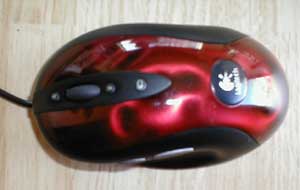
The grey covering has been replaced by a really shiny red futuristic glossy look. Aesthetically, it might not please some but I think it makes the mouse look pretty cool. There might even be some enthusiasts out there that will mod their box to match the mouse. The sides are still black rubber. Whether you love or hate the way the MX500 feels, you’re going to feel the same way about the MX510 as they are essentially the same design.
The optical engine is improved in the MX510 as described by Logitech. The eye has had its capture rate increased from the original 4.7 megapixels/sec to 5.8 megapixels/sec in the MX510. The increase is suppose to translate to better tracking and helps alleviate the aspect known as "negative acceleration". What that is is the feeling of the mouse not keeping up with your movement. The improvements in the optical engine and mouse drivers combine to combat negative acceleration.
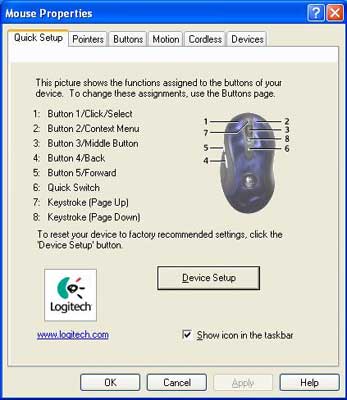
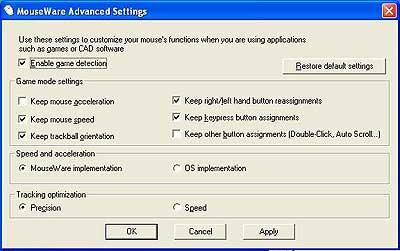
A specialized version of the Logitech mouse software gives the MX510 some more options to customize the buttons. The thumb buttons are recognized in some games now as button 4 and button 5. You can alternate assigning the wheel buttons to buttons 1-5 also if you would like to use them in some games. What if the game doesn’t detect the buttons? Well you can assign keystrokes to each button so you can have compatibility with any game. For the wheel buttons, I assigned them to Page Up and Page Down as in the picture and the games I tested detected them as such. Logitech also has an advanced settings for the MX510 that you can download from their site that also exposes some more options. I was very happy to see that you can map the buttons to any keystroke and the extra control features in the advanced settings program.
In general usage, the mouse provides the same smooth movement that the other MX mice do. From web browsing to programming to doing graphics work with Photoshop, the MX510 offers great control. The funky look might not fit into work places, but the performance is hard to beat. In fact, I primarily use the MX series for all my computers and the MX510 gives me the ability to easily maneuver around my desktop with ease AND jump into a game on breaks with great control.
Using the MX510 at a recent LAN party, I found the mouse to be very smooth. Even with my quick flicks and slight movements, the mouse kept up without any problems. Not once did I feel I was out of control and I was pretty sharp with my aim. The question is is it better than the predecessor, the MX500? It’s hard to say initially. I’ve been using the MX series of mice for a while now and part of me wants to say the MX510 feels smoother. Going from the MX500 and the MX510, there were instances where I thought the movement was smoother. It’s really hard to tell for me and my colleagues felt the same way. Buttons mapped as button 4 and 5 are not supported by all games. Unreal Tournament 2004 and Halo worked fine, but I could not get Call of Duty or Painkiller to recognize them. Even with the advanced settings game detection checked, some games still didn’t work. With those that don’t just map the buttons to a keystroke and you’re got a work around.
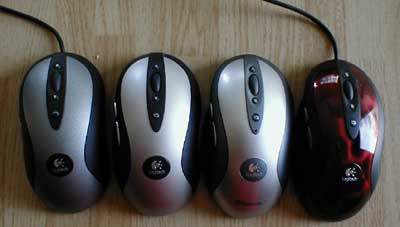
To really see if there is a difference, I hooked up my MX500 and MX510 to the same computer and loaded up a paint program. Since it was hard to tell with a few games I thought I’d do an easy test to see any difference. With both mice I moved back and forth in a very quick fashion and drew a few lines. The picture below will show you the results.
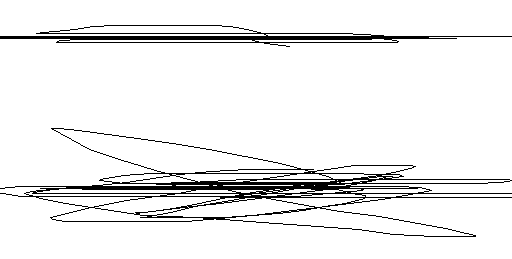
Can you tell which one is the MX510? I repeated this test several times and the results were always the same. The proof is in the pudding as they say and what you see is the improved optical engine at work. Logitech’s MX500 was a great gaming mouse and the above test shows the MX510 is even better.
The mouse is only available at Best Buy at this writing and because of its low supply and high demand; you might have some problems finding it. Should you upgrade if you already have a MX500? That’s a tough call, but the MX510 does offer smoother movement for games. For those searching for a new mouse it’s really a no brainer to pick up the MX510. The MX510 is a great buy as it costs the same as the MX500 and you get better gaming compatibility and performance. As a gamer, I highly recommend this mouse.
The look of the mouse, with the exception of the color scheme, is the same as the MX500 and its wireless variants. The top portion and the left and right clicks appear to be one construct but actually operate separately. The sides of the mouse are rubberized to offer maximal grip while the thumb groove allows for a comfortable hold. There is also an additional groove on the right side of the mouse to accommodate the ring finger of your right hand. Sadly though, southpaws might find themselves having a hard time with this mouse. Everything seems to be designed with right-handers in mind including the grooves and the buttons.
The grey covering has been replaced by a really shiny red futuristic glossy look. Aesthetically, it might not please some but I think it makes the mouse look pretty cool. There might even be some enthusiasts out there that will mod their box to match the mouse. The sides are still black rubber. Whether you love or hate the way the MX500 feels, you’re going to feel the same way about the MX510 as they are essentially the same design.
The optical engine is improved in the MX510 as described by Logitech. The eye has had its capture rate increased from the original 4.7 megapixels/sec to 5.8 megapixels/sec in the MX510. The increase is suppose to translate to better tracking and helps alleviate the aspect known as "negative acceleration". What that is is the feeling of the mouse not keeping up with your movement. The improvements in the optical engine and mouse drivers combine to combat negative acceleration.
A specialized version of the Logitech mouse software gives the MX510 some more options to customize the buttons. The thumb buttons are recognized in some games now as button 4 and button 5. You can alternate assigning the wheel buttons to buttons 1-5 also if you would like to use them in some games. What if the game doesn’t detect the buttons? Well you can assign keystrokes to each button so you can have compatibility with any game. For the wheel buttons, I assigned them to Page Up and Page Down as in the picture and the games I tested detected them as such. Logitech also has an advanced settings for the MX510 that you can download from their site that also exposes some more options. I was very happy to see that you can map the buttons to any keystroke and the extra control features in the advanced settings program.
In general usage, the mouse provides the same smooth movement that the other MX mice do. From web browsing to programming to doing graphics work with Photoshop, the MX510 offers great control. The funky look might not fit into work places, but the performance is hard to beat. In fact, I primarily use the MX series for all my computers and the MX510 gives me the ability to easily maneuver around my desktop with ease AND jump into a game on breaks with great control.
Using the MX510 at a recent LAN party, I found the mouse to be very smooth. Even with my quick flicks and slight movements, the mouse kept up without any problems. Not once did I feel I was out of control and I was pretty sharp with my aim. The question is is it better than the predecessor, the MX500? It’s hard to say initially. I’ve been using the MX series of mice for a while now and part of me wants to say the MX510 feels smoother. Going from the MX500 and the MX510, there were instances where I thought the movement was smoother. It’s really hard to tell for me and my colleagues felt the same way. Buttons mapped as button 4 and 5 are not supported by all games. Unreal Tournament 2004 and Halo worked fine, but I could not get Call of Duty or Painkiller to recognize them. Even with the advanced settings game detection checked, some games still didn’t work. With those that don’t just map the buttons to a keystroke and you’re got a work around.
To really see if there is a difference, I hooked up my MX500 and MX510 to the same computer and loaded up a paint program. Since it was hard to tell with a few games I thought I’d do an easy test to see any difference. With both mice I moved back and forth in a very quick fashion and drew a few lines. The picture below will show you the results.
Can you tell which one is the MX510? I repeated this test several times and the results were always the same. The proof is in the pudding as they say and what you see is the improved optical engine at work. Logitech’s MX500 was a great gaming mouse and the above test shows the MX510 is even better.
The mouse is only available at Best Buy at this writing and because of its low supply and high demand; you might have some problems finding it. Should you upgrade if you already have a MX500? That’s a tough call, but the MX510 does offer smoother movement for games. For those searching for a new mouse it’s really a no brainer to pick up the MX510. The MX510 is a great buy as it costs the same as the MX500 and you get better gaming compatibility and performance. As a gamer, I highly recommend this mouse.
Mouseware for the MX510 gives you a more functionality but there are still some games that won't recognize the extra buttons. No problem as you can map the non-working buttons to keystrokes and use them in the game The mouse performs excellent and will make gamers happy.. if you can find it.
Rating: 9.4 Class Leading
* The product in this article was sent to us by the developer/company.

About Author
I've been reviewing products since 1997 and started out at Gaming Nexus. As one of the original writers, I was tapped to do action games and hardware. Nowadays, I work with a great group of folks on here to bring to you news and reviews on all things PC and consoles.
As for what I enjoy, I love action and survival games. I'm more of a PC gamer now than I used to be, but still enjoy the occasional console fair. Lately, I've been really playing a ton of retro games after building an arcade cabinet for myself and the kids. There's some old games I love to revisit and the cabinet really does a great job at bringing back that nostalgic feeling of going to the arcade.
View Profile