
Gaming Nexus's move to new technologies and design
Written by John Yan on 9/18/2005 for
More On:
After a few years with our current state, I decide to move the site to
a new direction in terms of a redesign. As a full time .NET developer,
I knew the benefits of moving the site from its current ASP scripted
design to the Microsoft technology. I wanted to take full advantage of
using an object oriented design and powerful language in C#. I’ve
gotten some great experience working on a few projects and I wanted to
utilize the things I’ve learned to make a much better site. My goals
were to:
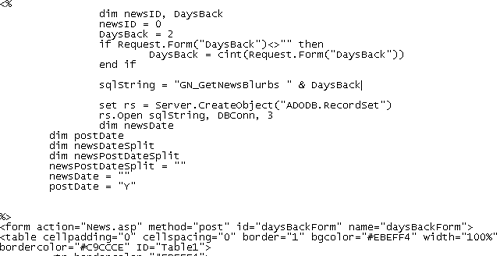
Accessing the database in the old site was usually done using ADO. Here’s an example:
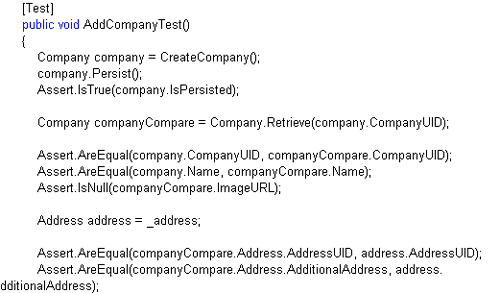
On a few previous applications I built at my other job, I utilized a persistence framework instead. A persistence framework moves the program data in its most natural form (in memory objects) to and from a permanent data store the database. The persistence framework manages the database and the mapping between the database and the objects. There are plenty out there both commercially and through open source. Because I wanted to leverage open source, I found a few that were on Sourceforge.net. Of the ones I researched, Gentle.NET was the one that I found that provided the features I needed. Most of the other ones I saw had you make an XML file to map the objects to the database. But with Gentle, all I needed to do was mark up my object with attributes and I could save, retrieve, and update data in the database. Normally, you would create an object, create stored procedures, and functions in the object to call the stored procedures to do all the functions. I wanted to get away from stored procedures and the pros and cons of this approach is another long subject to be debated elsewhere but the persistence framework should take care of it all. With Gentle.NET, this is all I need to do to get an object to persist in and out of the database:

Simple, eh? Another great feature of Gentle.NET is independence from a database platform. So I could take the same objects and run them on Oracle or MySQL or whatever Gentle supports, which is a lot. This decouples me from the database and if I decide to change database sources or move to a hosting company that offers a different database, I only have to make a few changes to my config files and references and I’m done.I really enjoy test driven development where I create tests for my objects and how they should work and then write the code to implement the objects. Using NUNIT, I have a very good testing framework that ensures that if I do change the code it won’t break what’s working previously. Say I want to rewrite portions of the code to improve the speed after the site has been up for a few months. With a previously passing NUNIT test on the objects, I can refactor the code with confidence in that it will work exactly as it did when I went into production but with improvements.
Moving from ASP to .NET will increase the speed of the site because .NET works off compiled code for the most part. Like anything you can bloat your code enough to make the site slower than a scripted ASP page. Nevertheless, moving to .NET also made it easier to code and debug. And when I decide to add enhancements to the site, working with an object oriented model will make inputting enhancements easier and quicker.
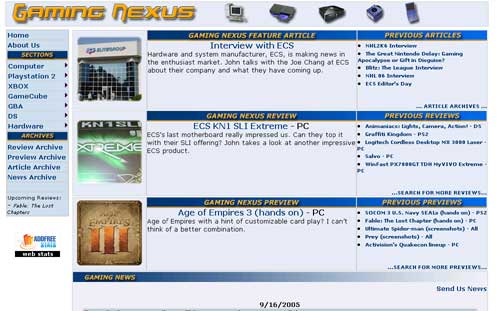
You can see the difference between the old design and color scheme compared to the new one we have now. One thing I’m very proud of is the fact that we don’t have any ads on the site. Therefore, I didn’t take into consideration of any ad placement areas. The site and the bandwidth are paid out of our own pockets and we’re going to keep it that way as long as possible. It’s been like that for eight years through various incarnations of this site and I think we’ll stay that way for a very long time. Besides, if I put ads on Gaming Nexus, I’d probably block it out myself with Firefox’s adblock extension.
Our old site design relied heavily on tables to create the layout. Tables, while easy to create, are slow and need to be rendered completely before anything shows up on your browser. So for modem users, it would take a while to load up and you will only see blank squares until the tables were rendered. The new approach was to make it a table-less design completely using DIVS and SPANS. Take a look at the source code. You won’t see one single table in there in the main content area. There might be tables from some of the open source objects I’ve used but for the most part, the main parts of the site are all DIV and SPAN tags. To get the site to layout correctly, we rely heavily on CSS. Sites like ESPN, MSN, and others have moved to this approach and you can get a great feel of how powerful this can be if you visit CSS ZEN Garden. Besides the increase in speed, less bandwidth is used as CSS is cached on your machine and there’s less code to create a page without a table. And if I decide to make a design change, all I would need is to fiddle with the CSS. No longer will I have to mess with tables with nested tables or row spans or column spans. Tables are still useful for showing tabular data and we still use tables for the article search results since the DataGrid control we use in .NET renders out the data in a table but for a site layout, I think this approach is much more extensible and robust.
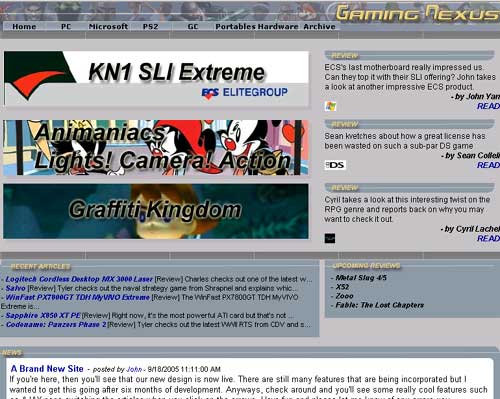
There are a few other areas where we rely on CSS to do our work. Looking at the borders around the news items and the article, you can see two rounded corners on opposite corners of some text areas. Normally, this is done by cutting out a rounded corner in Photoshop and then stuck on the corners of the text area. What may surprise you though is the rounded corners are done without any images and done with just a javascript file and CSS. I picked up this cool little code from Nifty Corners.For the drop down menu at the top, I started out with an open source .NET menu system entitled skmMenu. Unfortunately, changing our DocType in our web page to tell the browser to use a strict rendering method and trying to conform to web standards caused the menu’s drop down to behave erratically. While I would normally delve into the code and try to fix it myself, I didn’t want to spend the time when I had another easy alternative on my hands. What I do now instead is use an HTML list and use CSS to convert the bullet items to a drop down menu. Here’s a sample of the HTML:
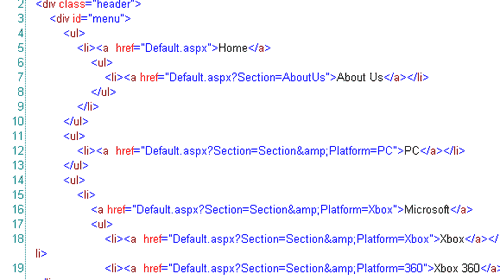
And with just a reference to a CSS style, it changes it from the traditional bullet list that we are all familiar with to a nicely formatted drop down menu.
I’ve always hated the fact that text in programs such as Photoshop and Flash look a lot better than HTML text. Because HTML text doesn’t have any anti-aliasing, it will never look as good. There’s a great text replacement tool titled sIFR that I use to generate those nice looking headlines. If you don’t have Flash, you get the traditional HTML text but for those that have Flash enabled, you get very clean looking headlines. All the replacement is done using an SWF with the font I specified and a javascript include that has the code to do the replacement.
One of the biggest challenges was making benchmarks a lot easier to do. Previously, I would put all my test scores in an Excel worksheet and generate graphs from that. I’d then take the graph and put it into Photoshop to create a GIF. It’s a tedious process and I knew there had to be an easier way. I spent a lot of time on the database structure to allow me to enter in a wide variety of combinations of variables that make up a benchmark. So I can add benchmarks for different systems, product patches, video drivers, and picture quality features to name a few. There’s even support for doing time based benchmarks with a line graph rather than the traditional average bar graph should I decide to go with that benchmarking approach. With that in place I looked for some graphing utilities. There are some nice free ones and some great open source ones but I decided to do something simple and leverage the .NET GDI API and write some objects to draw them on the fly. They do have some nice methods to create some effects such as the gradient on the bars themselves. The code wasn’t that much and I’ll be continuously upgrading the object to add more charting features. Since branding on the site can change, I can now change the benchmark branding and it will be reflected by all the past ones I’ve done. It’s actually one of the things in the redesign that I am most proud of. You’ll be able to see this in a week or so as I put the data in to replace the old images.
AJAX is the big buzzword being thrown around lately. If you don’t know what AJAX is, it stands for Asynchronous JavaScript and XML. By leveraging the XMLHttpRequest object that’s supported by most modern browsers, you can render portions of websites with data without having to refresh the browser. I’ve done something like this many years ago on a web application I worked on where I displayed information from a server in real time without having any interaction from the user using DHTML. I had an object that would subscribe to a messaging service that would listen to incoming messages and display them as needed. AJAX is taking off now and I decided to add some of the technology into the site. If you go to the About US page, you can see it in action when you click on a writer’s name. What happens is there’s a JavaScript call that requests the data. When it finishes retrieving the data, another JavaScript function displays the retrieved data all without rendering the rest of the page which doesn’t change. You can also see this in action when displaying articles written by a writer and changing between review, preview, and articles. And the big demonstration of this feature is when you switch article pages with the arrows. There’s still the drop down with the page numbers and the normal submit button just in case. On the administration side, we use a web interface to enter in all the data like most sites. One of the things we hated was to enter in long articles and to add all the tags to markup the content like bolding, italicizing, or linking. In comes FreeTextBox to the rescue. With this free .NET object, you get a WYSIWYG editor for text. It’s like word lite built for the web and we can do things such as highlight text and edit. I also incorporated a spellchecker entitled NetSpell. With these two tools, we can type all our articles online complete with spellcheck and formatting.
I also developed some rules to help prevent some of our mistakes of scheduling an article to go live only to be missing content. While I can’t prevent all mistakes, I did create a validation procedure that all articles must pass before it will be set active. This will help curb some of human error where we line up an article and forget about it down the line. You won’t see it but it will show up on our administrative site as a past article that still hasn’t been approved.
So that’s an insight on how I went through in moving the site to a new technology, architecture, and branding. It’s definitely a lot of work for one person and to also find time to play games and write reviews along with keeping another full time job has been one big juggling act. I would like to thank my wife for putting up with me through all this and bless her heart for having so much patience and understanding to see me through this. Hopefully, this architecture will last for a few years and I can keep enhancing it to keep making the site fresh. There’s still much to do such as making the site pass W3C validation but there are some aspects of .NET that prevent that currently. I know I won’t cringe now when thinking about adding a feature to the site as I did before in having to wade through all the ASP code.
- Improve the speed
- Architect a more robust and easily upgradeable site
- Leverage open source products
Accessing the database in the old site was usually done using ADO. Here’s an example:
On a few previous applications I built at my other job, I utilized a persistence framework instead. A persistence framework moves the program data in its most natural form (in memory objects) to and from a permanent data store the database. The persistence framework manages the database and the mapping between the database and the objects. There are plenty out there both commercially and through open source. Because I wanted to leverage open source, I found a few that were on Sourceforge.net. Of the ones I researched, Gentle.NET was the one that I found that provided the features I needed. Most of the other ones I saw had you make an XML file to map the objects to the database. But with Gentle, all I needed to do was mark up my object with attributes and I could save, retrieve, and update data in the database. Normally, you would create an object, create stored procedures, and functions in the object to call the stored procedures to do all the functions. I wanted to get away from stored procedures and the pros and cons of this approach is another long subject to be debated elsewhere but the persistence framework should take care of it all. With Gentle.NET, this is all I need to do to get an object to persist in and out of the database:
Simple, eh? Another great feature of Gentle.NET is independence from a database platform. So I could take the same objects and run them on Oracle or MySQL or whatever Gentle supports, which is a lot. This decouples me from the database and if I decide to change database sources or move to a hosting company that offers a different database, I only have to make a few changes to my config files and references and I’m done.I really enjoy test driven development where I create tests for my objects and how they should work and then write the code to implement the objects. Using NUNIT, I have a very good testing framework that ensures that if I do change the code it won’t break what’s working previously. Say I want to rewrite portions of the code to improve the speed after the site has been up for a few months. With a previously passing NUNIT test on the objects, I can refactor the code with confidence in that it will work exactly as it did when I went into production but with improvements.
Moving from ASP to .NET will increase the speed of the site because .NET works off compiled code for the most part. Like anything you can bloat your code enough to make the site slower than a scripted ASP page. Nevertheless, moving to .NET also made it easier to code and debug. And when I decide to add enhancements to the site, working with an object oriented model will make inputting enhancements easier and quicker.
You can see the difference between the old design and color scheme compared to the new one we have now. One thing I’m very proud of is the fact that we don’t have any ads on the site. Therefore, I didn’t take into consideration of any ad placement areas. The site and the bandwidth are paid out of our own pockets and we’re going to keep it that way as long as possible. It’s been like that for eight years through various incarnations of this site and I think we’ll stay that way for a very long time. Besides, if I put ads on Gaming Nexus, I’d probably block it out myself with Firefox’s adblock extension.
Our old site design relied heavily on tables to create the layout. Tables, while easy to create, are slow and need to be rendered completely before anything shows up on your browser. So for modem users, it would take a while to load up and you will only see blank squares until the tables were rendered. The new approach was to make it a table-less design completely using DIVS and SPANS. Take a look at the source code. You won’t see one single table in there in the main content area. There might be tables from some of the open source objects I’ve used but for the most part, the main parts of the site are all DIV and SPAN tags. To get the site to layout correctly, we rely heavily on CSS. Sites like ESPN, MSN, and others have moved to this approach and you can get a great feel of how powerful this can be if you visit CSS ZEN Garden. Besides the increase in speed, less bandwidth is used as CSS is cached on your machine and there’s less code to create a page without a table. And if I decide to make a design change, all I would need is to fiddle with the CSS. No longer will I have to mess with tables with nested tables or row spans or column spans. Tables are still useful for showing tabular data and we still use tables for the article search results since the DataGrid control we use in .NET renders out the data in a table but for a site layout, I think this approach is much more extensible and robust.
There are a few other areas where we rely on CSS to do our work. Looking at the borders around the news items and the article, you can see two rounded corners on opposite corners of some text areas. Normally, this is done by cutting out a rounded corner in Photoshop and then stuck on the corners of the text area. What may surprise you though is the rounded corners are done without any images and done with just a javascript file and CSS. I picked up this cool little code from Nifty Corners.For the drop down menu at the top, I started out with an open source .NET menu system entitled skmMenu. Unfortunately, changing our DocType in our web page to tell the browser to use a strict rendering method and trying to conform to web standards caused the menu’s drop down to behave erratically. While I would normally delve into the code and try to fix it myself, I didn’t want to spend the time when I had another easy alternative on my hands. What I do now instead is use an HTML list and use CSS to convert the bullet items to a drop down menu. Here’s a sample of the HTML:
And with just a reference to a CSS style, it changes it from the traditional bullet list that we are all familiar with to a nicely formatted drop down menu.
I’ve always hated the fact that text in programs such as Photoshop and Flash look a lot better than HTML text. Because HTML text doesn’t have any anti-aliasing, it will never look as good. There’s a great text replacement tool titled sIFR that I use to generate those nice looking headlines. If you don’t have Flash, you get the traditional HTML text but for those that have Flash enabled, you get very clean looking headlines. All the replacement is done using an SWF with the font I specified and a javascript include that has the code to do the replacement.
One of the biggest challenges was making benchmarks a lot easier to do. Previously, I would put all my test scores in an Excel worksheet and generate graphs from that. I’d then take the graph and put it into Photoshop to create a GIF. It’s a tedious process and I knew there had to be an easier way. I spent a lot of time on the database structure to allow me to enter in a wide variety of combinations of variables that make up a benchmark. So I can add benchmarks for different systems, product patches, video drivers, and picture quality features to name a few. There’s even support for doing time based benchmarks with a line graph rather than the traditional average bar graph should I decide to go with that benchmarking approach. With that in place I looked for some graphing utilities. There are some nice free ones and some great open source ones but I decided to do something simple and leverage the .NET GDI API and write some objects to draw them on the fly. They do have some nice methods to create some effects such as the gradient on the bars themselves. The code wasn’t that much and I’ll be continuously upgrading the object to add more charting features. Since branding on the site can change, I can now change the benchmark branding and it will be reflected by all the past ones I’ve done. It’s actually one of the things in the redesign that I am most proud of. You’ll be able to see this in a week or so as I put the data in to replace the old images.
AJAX is the big buzzword being thrown around lately. If you don’t know what AJAX is, it stands for Asynchronous JavaScript and XML. By leveraging the XMLHttpRequest object that’s supported by most modern browsers, you can render portions of websites with data without having to refresh the browser. I’ve done something like this many years ago on a web application I worked on where I displayed information from a server in real time without having any interaction from the user using DHTML. I had an object that would subscribe to a messaging service that would listen to incoming messages and display them as needed. AJAX is taking off now and I decided to add some of the technology into the site. If you go to the About US page, you can see it in action when you click on a writer’s name. What happens is there’s a JavaScript call that requests the data. When it finishes retrieving the data, another JavaScript function displays the retrieved data all without rendering the rest of the page which doesn’t change. You can also see this in action when displaying articles written by a writer and changing between review, preview, and articles. And the big demonstration of this feature is when you switch article pages with the arrows. There’s still the drop down with the page numbers and the normal submit button just in case. On the administration side, we use a web interface to enter in all the data like most sites. One of the things we hated was to enter in long articles and to add all the tags to markup the content like bolding, italicizing, or linking. In comes FreeTextBox to the rescue. With this free .NET object, you get a WYSIWYG editor for text. It’s like word lite built for the web and we can do things such as highlight text and edit. I also incorporated a spellchecker entitled NetSpell. With these two tools, we can type all our articles online complete with spellcheck and formatting.
I also developed some rules to help prevent some of our mistakes of scheduling an article to go live only to be missing content. While I can’t prevent all mistakes, I did create a validation procedure that all articles must pass before it will be set active. This will help curb some of human error where we line up an article and forget about it down the line. You won’t see it but it will show up on our administrative site as a past article that still hasn’t been approved.
So that’s an insight on how I went through in moving the site to a new technology, architecture, and branding. It’s definitely a lot of work for one person and to also find time to play games and write reviews along with keeping another full time job has been one big juggling act. I would like to thank my wife for putting up with me through all this and bless her heart for having so much patience and understanding to see me through this. Hopefully, this architecture will last for a few years and I can keep enhancing it to keep making the site fresh. There’s still much to do such as making the site pass W3C validation but there are some aspects of .NET that prevent that currently. I know I won’t cringe now when thinking about adding a feature to the site as I did before in having to wade through all the ASP code.
* The product in this article was sent to us by the developer/company.

About Author
I've been reviewing products since 1997 and started out at Gaming Nexus. As one of the original writers, I was tapped to do action games and hardware. Nowadays, I work with a great group of folks on here to bring to you news and reviews on all things PC and consoles.
As for what I enjoy, I love action and survival games. I'm more of a PC gamer now than I used to be, but still enjoy the occasional console fair. Lately, I've been really playing a ton of retro games after building an arcade cabinet for myself and the kids. There's some old games I love to revisit and the cabinet really does a great job at bringing back that nostalgic feeling of going to the arcade.
View Profile