
Ideazon Zboard
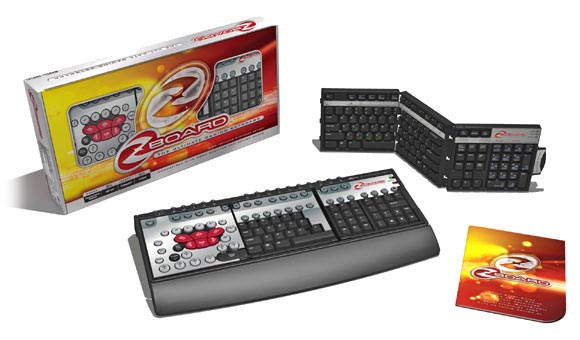
Gaming keyboards are nothing new, but ones that provide actual functionality most certainly are. In the past a number of keyboard solutions have been released, some of which remove the keyboard component entirely (Space Devilfish) and others that look to make the keys more accessible. While these are nice, none of them have truly changed the way that you play the game, but simply just mimics it. This is where the Zboard moves ahead of the competition. Instead of simply replacing the keys or mimicking them, the device places them at your fingertips, making for an all-around improved gaming experience. And while the design isn't perfect, it's probably the best keyboard alternative available on the market today.The Zboard is constructed out of the plastic that is commonly found on monitors and keyboards. In an effort to save space the device utilizes the common rectangular design that graces more USB keyboards. On the top of the keyboard are various “hot buttons” which can be user-configured to place any program at your finger tips. There are two powered USB ports on the back side of the keyboard, effectively turning the device into a decent USB hub. It can’t handle heavyweights like printers or scanners but they’re capable of handling my Logitech MX700 and Griffin Technology Power Mate at the same time without causing any problems. The unit itself is USB powered so the two ports will yield you an extra port. There are legs on the bottom of the unit that can be extended to elevate the keys while an included guard helps to prevent soreness in the wrists.
Of course this is nice and all but the keyboard has a trick up its sleeve that separates it from the pack; interchangeable keysets. That’s right, the keys can be replaced to cater to both gamers and productivity-minded users. Changing the keys is a snap, literally. All of the keysets are comprised of three panes which fold and unfold along the hinges. All you have to do is unsnap the side of the keyboard and pull the existing keyset out. Replace it with another keyset and the Zboard software (which runs in the background) automatically detects which keyset is in place.. The Zboard comes bundled with two keysets to start you off with with well over 10 optional keysets available for purchase.
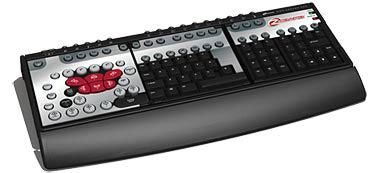
That's not what the product was designed for though; when used as a gaming device it performs superbly. What’s nice about the gaming keyset is that it doesn’t just remap your keys, it changes them entirely. Designed with first person shooters in mind, the device places all of the major commands within reach of your left hand. The WASD keys are replaced by larger keys that look and feel better than standard keys. Functions such as crouch and jump are mapped out to specific buttons that mimic the placement of the spacebar and control keys while the Q and E functions (generally used for peaking around corners) are placed in similar positions. You are able to still type with the gaming keyset but the character keys are shifted over to the right by a couple of inches. In addition to becoming compacted the numeric pad is removed entirely, forcing you to rely on the horizontal line of numbers on the top of the keyboard. In essence, you're still able to type with the gaming keyset (which is nice) but you probably won't be able to do so without having to look at the keys when you're doing so.
In addition to the gaming keyset a number of game specific keysets are available for purchase. It was developed to give the gamer every possible advantage so it’s no coincidence that the keysets currently available for purchase cater to the competitive online crowd. At the moment you can purchase game-specific keysets for Neverwinter Nights, Medal of Honor: Allied Assault, EverQuest, Age of Empires, DOOM 3 and in the near future, EverQuest II. Each of them retails for $20 a piece and features game-specific layouts and gorgeous artwork from the game.
I was able to test out the unit with a number of games thanks to the presets that the developers specifically created for the gaming keyset. I wanted to try out the game in a wide variety of situations so I decided to try out the following games in order to see how the unit performs: Far Cry, DOOM 3, Perimeter and NHL 2004. Since the device was designed with first person shooter fans in mind, I decided that it would only be fair if I did my primary tests on them. For variety I chose three different types of shooters to see how the keysets handle in differing situations.
Through the included software players can select which configuration to use with the gaming keyset. By clicking on the Z icon that resides in the taskbar, the interface arises, showing the current layout. At the moment there are layouts available for most of today's popular games including Black Hawk Down, UT2003, UT2004, Joint Ops and more. More can be downloaded from the Web site and if you're not satisfied with the designers layouts you can always create your own.
Initially, I had trouble getting used to the pre-configured keyset because of the button placements. Instead of using the shift key to run the unit features a key specifically for the action. While it's placed in the same vicinity as the Shift key it's a round key about an inch in diameter. The Shift key is twice that size, making it much easier to reach in the midst of the action. Maneuvering and peaking around corners was simple because those too have been enlarged. Initially I had some trouble reloading and crouching but after a few more minutes I was back to my old ways.
Ideazon sent me the DOOM 3 keyset and I must admit, it's a real treat to use. The unit features some gorgeous artwork from the game that makes the device really appealing to the eyes. Since DOOM 3 lacks the lean functions found in most of today's shooters the designers mapped out the reload and flashlight functions to those buttons. On the default keyboard the flashlight function is mapped out to the F key so training my fingers to reach for the E key after all of the hours I put into the game was pretty difficult. Otherwise the game plays much better with the Zboard keyset thanks to the larger buttons which feel much better against the fingertips.
Another highly competitive arena for online gaming resides in the real-time strategy genre. In fact it's so competitive that Ideazon manufactures a specific keyset that caters to fans of Age of Mythology and Empires: Dawn of the New World. There's a problem with trying to play RTS games with the gaming keyset though, the placement of the left-most pane (designed for first person shooters) is detrimental to the overall experience. This is why Ideazon's RTS-specific keysets abandon the enlarged left pane and replaces them with a more standard configuration. Suffice to say I had some difficulties playing Perimeter with the gaming keyset and chose to revert back to the standard keyset.
Other than online parlor games, the last bastion of online competitiveness resides in the sports arena. For this I booted up my copy of NHL 2004 to see how the action controlled on the ice. Surprisingly the unit performed exceptionally well when I remapped the keys, giving me better control of the action. The keys simply felt better and I had an easier time manuevering and controlling the players here than I would with the standard keyset.One of the most pleasant features of the Zboard comes in the form of labels on the keyboard. Printed in green, the labels tell you what the keys do when pressed in conjunction with the control key. For instance, the A key says "All" underneath it while the F says "Find." Sure, those are simple and obvious ones but how many of you out there knew that control W can close documents and that control Z can undo actions? They're not amazing if you're Word savvy, but hardcore gamers who are casual productivity geeks will get some extra mileage out of them. Actually, the device is so versatile that Ideazon makes keysets that cater to productivity-minded users. Through their Web site you can find keysets for popular apps such as Word, Excel, Photoshop and Dreamweaver. In addition to looking great they actually improve your productivity by training your mind to recognize all of the shortcuts.
Unlike most niche gaming products, the Zboard is available from a wide variety of retailers at a pretty attractive price point. Ideazon sets the suggested retail price at $49.99 for the base unit but etailers like Amazon sell it for as low as $38.88. This is a pretty good value considering that you're getting a USB keyboard and an additional USB port. I haven't seen the device at retail stores before but I'm sure you can find them at PC retailers like Frys and CompUSA.
Ideazon's Zboard won't revolutionize the gaming industry but it most certainly changes the way that we play PC games. While the competition is busy showcasing shiny lights and flexible keyboards, Ideazon is hard at-work creating a keyboard that maximizes your gaming potential. It's for this reason why we've decided to give the Zboard our highest honor. Not just a competant keyboard, not just a USB hub, the Zboard is the true all-in-one solution for PC gamers of all kinds.
Rating: 9 Excellent
* The product in this article was sent to us by the developer/company.

About Author
Gaming has been a part of my life for as long as I could remember. I can still recall many a lost nights spent playing Gyromite with that stupid robot contraption for the old NES. While I'm not as old as the rest of the crew around these parts, I still have a solid understanding of the heritage and the history of the video gaming industry.
It's funny, when I see other people reference games like Doom as "old-school" I almost begin to cringe. I bet that half of these supposed "old-school" gamers don't even remember classic games like Rise of the Triad and Commander Keen. How about Halloween Harry? Does anyone even remember the term "shareware" anymore? If you want to know "old-school" just talk to John. He'll tell you all about his favorite Atari game, Custer's Revenge.
It's okay though, ignorance is bliss and what the kids don't know won't hurt them. I'll just simply smile and nod the next time someone tells me that the best entry in the Final Fantasy franchise was Final Fantasy VII.
When I'm not playing games I'm usually busy sleeping through classes at a boring college in Southern Oregon. My current hobbies are: writing songs for punk rock bands that never quite make it, and teasing Bart about... well just teasing Bart in general. I swear the material writes itself when you're around this guy. He gives new meaning to the term "moving punching bag."
As for games, I enjoy all types except those long-winded turn-based strategy games. I send those games to my good pal Tyler, I hear he has a thing for those games that none of us actually have the time to play.
When I'm not busy plowing through a massive pile of video games I spend all of my time trying to keep my cute little girl fed. She eats a ton but damn she's so hot. Does anyone understand the Asian girl weight principal? Like they'll clean out your fridge yet still weigh less than 110 pounds.
Currently I'm playing: THUG, True Crime, Prince of Persia, Project Gotham 2 and Beyond Good & Evil. View Profile
