
ATI Remote Wonder
Written by Charles Husemann on 2/21/2003 for
PC
More On:
ATI Remote Wonder
The Remote Wonder from ATI is a radio frequency (RF) PC remote control that allows you to control the AV capabilities of your PC without a keyboard or mouse. This is first generation technology and while it shows a lot of promise, there are a few bugs that need to be ironed out.
The Remote Wonder is optimized to work with ATI’s line of video cards, which come with the ATI Multimedia Center software. For this review, I decided to see what kind of value this remote adds for those who have chosen a non-ATI solution.
Installing the device is fairly straight forward, you first install the software and then plug in the RF receiver into an available USB slot and you’re good to go. The range on the remote is pretty good as well. I was able to use the remote from about 15 feet away and in the other room so range is not really an issue. This could be a possible source of mischief if you were to install the device on a friend’s computer and then manipulate it remotely but I don’t think that is something that ATI had in mind when they created this though.
The remote is about the size of your standard TV remote (2.5 inches wide by 2.5 inches wide and a half inch deep). It has 42 buttons, (6 programmable buttons and 36 pre-programmed buttons), and is pretty ergo-licious with the primary focus of the remote being the thumb pad.
ATI provided us with the unreleased 1.4 version of the Remote Wonder drivers which add a ton of functionality to the remote. The software that ships with the remote only allows you to assign a few simple keystrokes but the new version adds more assignable commands along with the ability to launch applications from the buttons. One cool feature is the ability to assign arbitrary to the buttons (i.e. if you want to assign CNTL-ALT-L to a button you can do that). This allows you to assign hotkey functions inside applications to a button on the remote.
The new version also enables you to assign applications to the buttons. You simply surf your system and select the executable of the application you want to assign to the button. The disappointing thing is that you have to assign an executable. The application will not allow you to enter a URL or parameters for the application. This would be nice so that you could assign commonly visited Web sites or have buttons assigned to audio/video streams on the Internet. You can get around this by selecting the Internet Explorer or Media Player Executable and then passing it a URL but that’s kind of tricky and it doesn’t always work. The input box only accepts parameters in upper case so if you are accessing a stream on a server that is case sensitive it will not work. (“http://www.woxy.com/stream/wma.asx” works while “HTTP://WWW.WOXY.COM/STREAM/WMA.ASX” does not).
Another benefit of the new software is the addition of AMMO (Application Manipulation Modular Objects) plug-ins. AMMO is a software developer kit that allows third party developers to create plug-in modules for the Remote Wonder. This is a pretty cool concept since plug-ins can be created that allow you to control any function of an application with the remote control. The latest version of the drivers comes with two plug-ins, one for WinAmp and one for PowerPoint. (addtional plug-ins can be found at http://membres.lycos.fr/remotew/).
The plug-ins are a double edged sword, though. The WinAmp plug-in is a good example of this. Rather than using the Windows system controls for volume and muting, it uses WinAmp’s controls. The problem is WinAmp’s volume maxes out at a lower level than Windows and the mute command in WinAmp sets the volume to zero rather than actually toggling the sound off at the system level(which means you have to crank the volume back up rather than just restoring the sound). This is a small thing. but it still can be frustrating. The included PowerPoint slide is also pretty solid but there’s not a lot of complexity in conducting a Power Point presentation.
One thing they could have included in the software is a task switching application (similar to the one that Logitech includes in the current version of their mouse ware drivers). You can bind a button to the ALT-TAB combination but all that lets you do is switch between two applications. If you have three applications open, you have to mouse down and use the task bar. You could get around this if you are using one of the dedicated function buttons (DVD, TV, Web) but a dedicated task switching app would be a fantastic addition. Another addition to the wish list would be a pop-up keyboard app that allows you to enter text with the thumb pad. This would help eliminate the need for a keyboard altogether but it’s not an absolute necessity.Navigating with the thumb pad is fairly easy. The cursor accelerates the longer you hold it in one direction, which makes navigating the screen simple. The mouse speed as well as the acceleration speed can be control using the drivers (helpful for those who are a little slow on the draw). It takes a little while to get used to, but once you get comfortable with using it, navigating around is relatively painless. The placement of the buttons controlling the mouse is also well done. It would have been nice for the drag button to be grouped with the left mouse button but again, once you get used to it, it’s not a problem.
Even without the ATI software, the remote plays well with other multimedia applications. It worked very well with WinDVD 4 and Windows Media Player 9. The only functionality I didn’t test was the TV tuner integration. However given the support for the other multimedia applications, I don’t see this being a problem. The dedicated arrow buttons are great for navigating DVD menus and can also be used to navigate application menus (which is nice since navigating menus with the mouse can be a little difficult).
If you have a PC based entertainment center, the Remote Wonder is a good substitute for a wireless keyboard and mouse combo. Although, you will want to have a wired keyboard tucked away someplace. This is doubly true if you have an ATI video card. I found the remote handy while working on this review. It’s nice to have a quick way to lower or mute the volume without having to reach for a volume knob or power button. With solid (and improving software), the Remote Wonder is a fantastic piece of technology for those that have a PC based entertainment center.
The Remote Wonder is optimized to work with ATI’s line of video cards, which come with the ATI Multimedia Center software. For this review, I decided to see what kind of value this remote adds for those who have chosen a non-ATI solution.
Installing the device is fairly straight forward, you first install the software and then plug in the RF receiver into an available USB slot and you’re good to go. The range on the remote is pretty good as well. I was able to use the remote from about 15 feet away and in the other room so range is not really an issue. This could be a possible source of mischief if you were to install the device on a friend’s computer and then manipulate it remotely but I don’t think that is something that ATI had in mind when they created this though.
The remote is about the size of your standard TV remote (2.5 inches wide by 2.5 inches wide and a half inch deep). It has 42 buttons, (6 programmable buttons and 36 pre-programmed buttons), and is pretty ergo-licious with the primary focus of the remote being the thumb pad.
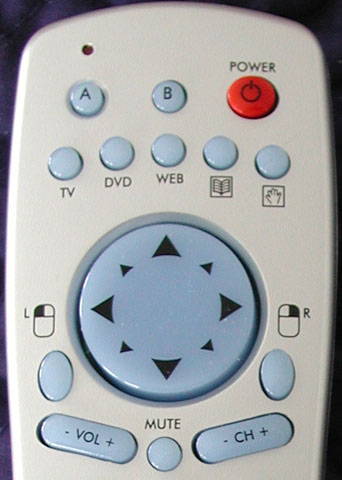
Close-up of where your thumb spends most of it's time with the remote
ATI provided us with the unreleased 1.4 version of the Remote Wonder drivers which add a ton of functionality to the remote. The software that ships with the remote only allows you to assign a few simple keystrokes but the new version adds more assignable commands along with the ability to launch applications from the buttons. One cool feature is the ability to assign arbitrary to the buttons (i.e. if you want to assign CNTL-ALT-L to a button you can do that). This allows you to assign hotkey functions inside applications to a button on the remote.
The new version also enables you to assign applications to the buttons. You simply surf your system and select the executable of the application you want to assign to the button. The disappointing thing is that you have to assign an executable. The application will not allow you to enter a URL or parameters for the application. This would be nice so that you could assign commonly visited Web sites or have buttons assigned to audio/video streams on the Internet. You can get around this by selecting the Internet Explorer or Media Player Executable and then passing it a URL but that’s kind of tricky and it doesn’t always work. The input box only accepts parameters in upper case so if you are accessing a stream on a server that is case sensitive it will not work. (“http://www.woxy.com/stream/wma.asx” works while “HTTP://WWW.WOXY.COM/STREAM/WMA.ASX” does not).
Another benefit of the new software is the addition of AMMO (Application Manipulation Modular Objects) plug-ins. AMMO is a software developer kit that allows third party developers to create plug-in modules for the Remote Wonder. This is a pretty cool concept since plug-ins can be created that allow you to control any function of an application with the remote control. The latest version of the drivers comes with two plug-ins, one for WinAmp and one for PowerPoint. (addtional plug-ins can be found at http://membres.lycos.fr/remotew/).
The plug-ins are a double edged sword, though. The WinAmp plug-in is a good example of this. Rather than using the Windows system controls for volume and muting, it uses WinAmp’s controls. The problem is WinAmp’s volume maxes out at a lower level than Windows and the mute command in WinAmp sets the volume to zero rather than actually toggling the sound off at the system level(which means you have to crank the volume back up rather than just restoring the sound). This is a small thing. but it still can be frustrating. The included PowerPoint slide is also pretty solid but there’s not a lot of complexity in conducting a Power Point presentation.
One thing they could have included in the software is a task switching application (similar to the one that Logitech includes in the current version of their mouse ware drivers). You can bind a button to the ALT-TAB combination but all that lets you do is switch between two applications. If you have three applications open, you have to mouse down and use the task bar. You could get around this if you are using one of the dedicated function buttons (DVD, TV, Web) but a dedicated task switching app would be a fantastic addition. Another addition to the wish list would be a pop-up keyboard app that allows you to enter text with the thumb pad. This would help eliminate the need for a keyboard altogether but it’s not an absolute necessity.Navigating with the thumb pad is fairly easy. The cursor accelerates the longer you hold it in one direction, which makes navigating the screen simple. The mouse speed as well as the acceleration speed can be control using the drivers (helpful for those who are a little slow on the draw). It takes a little while to get used to, but once you get comfortable with using it, navigating around is relatively painless. The placement of the buttons controlling the mouse is also well done. It would have been nice for the drag button to be grouped with the left mouse button but again, once you get used to it, it’s not a problem.
Even without the ATI software, the remote plays well with other multimedia applications. It worked very well with WinDVD 4 and Windows Media Player 9. The only functionality I didn’t test was the TV tuner integration. However given the support for the other multimedia applications, I don’t see this being a problem. The dedicated arrow buttons are great for navigating DVD menus and can also be used to navigate application menus (which is nice since navigating menus with the mouse can be a little difficult).
If you have a PC based entertainment center, the Remote Wonder is a good substitute for a wireless keyboard and mouse combo. Although, you will want to have a wired keyboard tucked away someplace. This is doubly true if you have an ATI video card. I found the remote handy while working on this review. It’s nice to have a quick way to lower or mute the volume without having to reach for a volume knob or power button. With solid (and improving software), the Remote Wonder is a fantastic piece of technology for those that have a PC based entertainment center.
With solid (and improving software), the Remote Wonder is a fantastic piece of technology for those that have a PC based entertainment center.
Rating: 8.8 Class Leading
* The product in this article was sent to us by the developer/company.

About Author
Hi, my name is Charles Husemann and I've been gaming for longer than I care to admit. For me it's always been about competing and a burning off stress. It started off simply enough with Choplifter and Lode Runner on the Apple //e, then it was the curse of Tank and Yars Revenge on the 2600. The addiction subsided somewhat until I went to college where dramatic decreases in my GPA could be traced to the release of X:Com and Doom. I was a Microsoft Xbox MVP from 2009 to 2014. I currently own stock in Microsoft, AMD, and nVidia.
