
ABIT KV8-MAX3
Written by John Yan on 2/17/2004 for
PC
More On:
ABIT KV8-MAX3
If there’s one thing about ABIT boards, they cater to enthusiasts and offer great stability and performance. With the recent release of AMD64 processors, ABIT has jumped into the ring with a very good board. The KV8-MAX3 board, featuring the uGuru technology, offers a plethora of features, includes, and additional cooling that’s sure to please many AMD64 owners looking for a great motherboard.
When I was sent the motherboard from ABIT, I was surprised at how well the packaging. Most motherboards manufactures just throw the extra parts and bits in the box but ABIT keeps their extras in nice white boxes that are neatly placed. And what ABIT has included with the board are plenty of cables and extras to satisfy even the most finicky motherboard purchasers.
The KV8-MAX3 utilizes the VIA K8T800/VT8237 north-south bridge configuration. The board supports the 754 pin configuration of the Athlon64 with an 800MHZ front side bus. Single channel mode support for PC3200 RAM with three DIMM slots lets you load up this board for up to 2GB of memory.
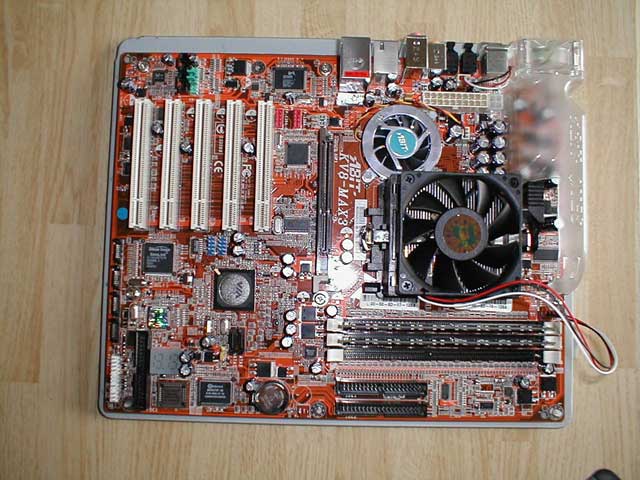
For the layout, ABIT did a pretty good job at placing items at logical and trouble-free spots. The feature that probably stands out most on this board is the cooling solution on the capacitors near one edge of the board. A plastic OTES housing helps funnel air out of the case via a fan on the back of the motherboard. The OTES anachronism was first used with a line of ABIT’s video cards and they have also included the name to the cooling solution for the MAX series of motherboards. With the fan on the OTES solution taking up a part of the backplate, the serial and parallel ports had to go. That’s ok as most products are using USB connectivity so the omission of the two types of ports isn’t going to be missed much.
The northbridge is cooled by an active solution with a familiar round ABIT fan. The edge of the fan housing barely clears the area needed to install the CPU heatsink fan but more care should be taken in watching the few capacitors in the corner near the OTES housing.
This is the first board that I’ve used recently that had the two power plugs placed right next to each other. It really does make sense and helps reduce stringing power cables to different areas. Since they are right next to each other, you can tie the two power plugs and have them go to the same place
There isn’t much room around the CPU socket with the northbridge cooler and a bank of capacitors nearby. The plastic OTES cooling casing also takes up some room and there’s a cutout near the side of the CPU socket to help facilitate some room to put in a heatsink. I’ve read of a few sites that were complaining about a lack of heat sink bracket and back plate. I can’t here as my setup sent by ABIT included the parts necessary to attach the stock heatsink.
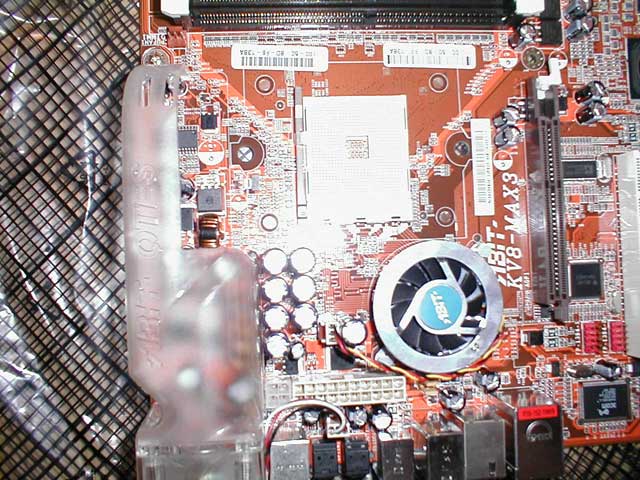
Five PCI slots and one AGP slot gives the KV8-MAX3 a lot of room for expansion. If you have a two slot cooling solution on your card like an OTES card or one of the newer NVIDIA cards, ABIT has put enough space between the first PCI slot and the AGP port so that none of your PCI slots will be compromised. Now, one side of the clips on the memory slots do align with the AGP port and the space between the first DIMM latch and the AGP lock are pretty close. Not much space is between and there can be a tight fit in there. You probably won’t be changing memory that much but it will probably get in the way if you do.
For storage connections, the KV8-MAX3 is loaded with Serial ATA ports. How many you ask? How about six ports for you and the board still holds two IDE connectors and a floppy connector. This board is ready to go full Serial ATA storage devices with plenty of ports to add them. The board also has a built in RAID controller so RAIDing Serial ATA hard drives will be no problem. ABIT has also included their SecureIDE bundle if you want to encrypt the data on your hard drive. It uses a 40-bit DES encryption and the encryption is done on through the X-Wall chip. If you want to decrypt the data, a key must be inserted into the included bracket. If your hard drive is ever stolen, you can be sure that unless the perpetrator spends a great deal of time trying to break the encryption, any sensitive data will be safe. SecureIDE is completely invisible to the operating system and your computer will not even know its being used.
A big selling point for the motherboard is the uGuru feature. uGuru is a hardware solution for monitoring your system and system tweaking. If you rather overclock without going through the BIOS, you can use the uGuru software to tweak your system from the CPU speed to voltages and everything in between. Monitoring various system features is a breeze with the software and the software is updated by ABIT. If you have problems, there’s a “Black Box” feature where you send information to ABIT with a click of a few buttons. Because the uGuru system is hardware based, it takes very minimal if any computer resources when running. The software does take up a small footprint but not that much.
Motherboard manufactures are switching away from beep codes to report errors and replying on other methods. The KV8-MAX3 has a two number LED display that will display a number of the error. Users with windows in the side of their cases can easily red the numbers and look up the problem. Those without the window will, of course, have to open the case to see. I would’ve liked to have to have external front plate, perhaps the size of a floppy drive, with the LED display and maybe some USB ports for those of us without windowed cases. In any case, I do like the number display to help diagnose errors.
The floppy and IDE cable are rounded allowing for better airflow through your system. The connectors have tabs that ease the task of pulling them free from storage devices. For good air flow through the case, rounded cables help immensely and ABIT’s decision to include them with the motherboard should please enthusiasts as well as regular computer users. The board also comes with four SATA cables.
The back connector area, as stated earlier, lacks serial or parallel ports but has plenty of connection options. Four USB ports and one firewire port allows for peripheral connections. The back still does have PS/2 ports for mouse and keyboard. Five audio connectors lets you connect 2.1 to 5.1 style audio systems and lets you attach a mic and/or a line in option. And finally for audio, an optical in and out connectors give you digital connections to receivers or other audio equipment. If you’re on a budget and don’t want to spend more for a sound card, the Realtek solution should be more than adequate.
Like most ABIT boards, the BIOS allows for many tweaks and adjustments. You can adjust your system as you pleas with a plethora of options. It’s a Phoenix AwardBIOS and while it offers probably anything you’ll ever need in tweaking a system, the uGuru system lets you access the many of the BIOS’s functions in Windows.
Now that you’ve read about the design, let’s get to some benching. Here are the specs of what was used to test:
AMD64 3200+
2 Crucial PC3200 256MB sticks
Maxtor 120 GIG 7200RPM HD
Sapphire Atlantis Radeon 9800 XT
Windows XP Service Pack 1
What you will see is the KV8-MAX3 board running up against the FIC K8-800T, both using the same VIA chipset. First up is some synthetic benchmarking. Let’s start with PC Mark 2004.

PC Mark 2004 is a new system benchmark from Futuremark and takes the system through various tests. The test scores are:
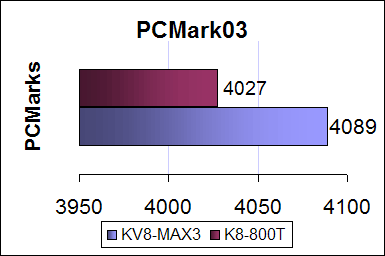
A score of 100 more PCMarks for the K8-800T give the FIC board the win here but it really isn’t that much. Let’s move to the last Futuremark benchmark of this review, 3D Mark 2001 SE.

For 3DMark 2001 SE, tests were run under default settings except for running at a resolution of 640x480. The benchmark is primarily a DirectX 8.1 benchmark. Here are the scores:
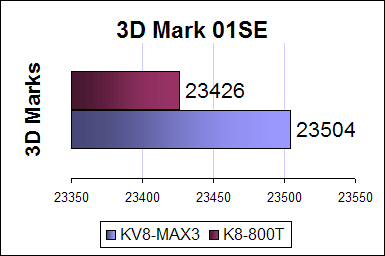
Again, the score’s for the two boards are pretty close. There’s not much separation between the two and I suspect that will be the case in the rest of the tests.

Our final synthetic benchmark is Aquamark 3. Tests were conducted at default settings and at a resolution of 1024x768. Aquamark 3 consists of tests from DirectX 7 to DirectX 9 and it’s used for a real world game.
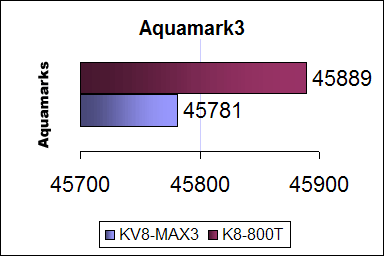
Scores are close again for both boards. Now that we’ve ran through the synthetic tests, lets try some real games. First up is the Microsoft shooter, Halo.

Halo, initially appearing on the Xbox, is the long awaited shooter from Bungie. It has a built in benchmark and for the tests, we used Pixel Shader 2.0 and set the resolution at 640x480.
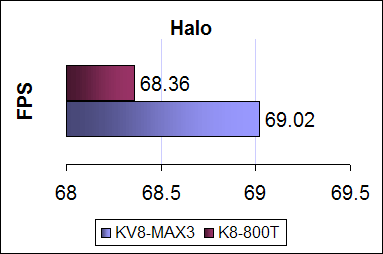
The KV8-MAX3 squeaks out ahead but again the performance of the two boards are really a match. Rather than beat a dead horse, I’ll show you the rest of the test scores as the results are pretty much going to be the same: the two boards perform pretty equally.

X2 – The Threat is a space simulator from Enlight Software and features some great model and texture work. The test was done at 640x480 with shadows on. The demo goes through various outer space environments with different ship architectures and sizes.

For Unreal Tournament 2003, we ran through a fly-by of DM-Phobos2. Resolution was set at 640x680.
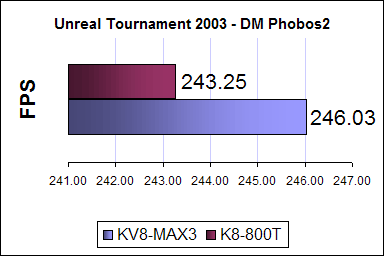

Tom Clancy’s Splinter Cell is a third person shooter from UbiSoft. We used Beyond3D’s demo and tests were done at 640x480.
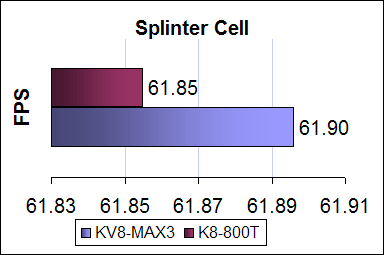

Finally, we have Final Fantasy Online. Square Enix has provided a benchmark program and tests were done at low quality. The test features a fly-by of various terrain and characters on screen.
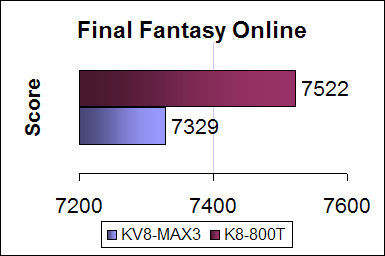
Performance between the two KT800 boards is pretty similar and that’s pretty much to be expected. I didn’t have an NForce3 board on hand to test so once we do have one in house, we’ll redo the tests comparing the two.
The KV8-MAX3 ran stable for me for the month or so in use. I didn’t experience anything strange and no weird crashes. I liked the layout and thought most everything was placed logically with a few minor quibbles about the space near the chipset. The board features a ton of options and the uGuru system works as advertised without interfering with the performance of the system. Performance wise, it seems to run neck and neck with the other KT800 board that was tested. The OTES cooling system was quiet and I didn’t even know it was running. I’ve always thought ABIT’s boards were of high quality and nothing’s changed with the KV8-MAX3. If you’re looking for a Socket 754 board, you really can’t go wrong with the KV8-MAX3.
When I was sent the motherboard from ABIT, I was surprised at how well the packaging. Most motherboards manufactures just throw the extra parts and bits in the box but ABIT keeps their extras in nice white boxes that are neatly placed. And what ABIT has included with the board are plenty of cables and extras to satisfy even the most finicky motherboard purchasers.
The KV8-MAX3 utilizes the VIA K8T800/VT8237 north-south bridge configuration. The board supports the 754 pin configuration of the Athlon64 with an 800MHZ front side bus. Single channel mode support for PC3200 RAM with three DIMM slots lets you load up this board for up to 2GB of memory.
For the layout, ABIT did a pretty good job at placing items at logical and trouble-free spots. The feature that probably stands out most on this board is the cooling solution on the capacitors near one edge of the board. A plastic OTES housing helps funnel air out of the case via a fan on the back of the motherboard. The OTES anachronism was first used with a line of ABIT’s video cards and they have also included the name to the cooling solution for the MAX series of motherboards. With the fan on the OTES solution taking up a part of the backplate, the serial and parallel ports had to go. That’s ok as most products are using USB connectivity so the omission of the two types of ports isn’t going to be missed much.
The northbridge is cooled by an active solution with a familiar round ABIT fan. The edge of the fan housing barely clears the area needed to install the CPU heatsink fan but more care should be taken in watching the few capacitors in the corner near the OTES housing.
This is the first board that I’ve used recently that had the two power plugs placed right next to each other. It really does make sense and helps reduce stringing power cables to different areas. Since they are right next to each other, you can tie the two power plugs and have them go to the same place
There isn’t much room around the CPU socket with the northbridge cooler and a bank of capacitors nearby. The plastic OTES cooling casing also takes up some room and there’s a cutout near the side of the CPU socket to help facilitate some room to put in a heatsink. I’ve read of a few sites that were complaining about a lack of heat sink bracket and back plate. I can’t here as my setup sent by ABIT included the parts necessary to attach the stock heatsink.
Five PCI slots and one AGP slot gives the KV8-MAX3 a lot of room for expansion. If you have a two slot cooling solution on your card like an OTES card or one of the newer NVIDIA cards, ABIT has put enough space between the first PCI slot and the AGP port so that none of your PCI slots will be compromised. Now, one side of the clips on the memory slots do align with the AGP port and the space between the first DIMM latch and the AGP lock are pretty close. Not much space is between and there can be a tight fit in there. You probably won’t be changing memory that much but it will probably get in the way if you do.
For storage connections, the KV8-MAX3 is loaded with Serial ATA ports. How many you ask? How about six ports for you and the board still holds two IDE connectors and a floppy connector. This board is ready to go full Serial ATA storage devices with plenty of ports to add them. The board also has a built in RAID controller so RAIDing Serial ATA hard drives will be no problem. ABIT has also included their SecureIDE bundle if you want to encrypt the data on your hard drive. It uses a 40-bit DES encryption and the encryption is done on through the X-Wall chip. If you want to decrypt the data, a key must be inserted into the included bracket. If your hard drive is ever stolen, you can be sure that unless the perpetrator spends a great deal of time trying to break the encryption, any sensitive data will be safe. SecureIDE is completely invisible to the operating system and your computer will not even know its being used.
A big selling point for the motherboard is the uGuru feature. uGuru is a hardware solution for monitoring your system and system tweaking. If you rather overclock without going through the BIOS, you can use the uGuru software to tweak your system from the CPU speed to voltages and everything in between. Monitoring various system features is a breeze with the software and the software is updated by ABIT. If you have problems, there’s a “Black Box” feature where you send information to ABIT with a click of a few buttons. Because the uGuru system is hardware based, it takes very minimal if any computer resources when running. The software does take up a small footprint but not that much.
Motherboard manufactures are switching away from beep codes to report errors and replying on other methods. The KV8-MAX3 has a two number LED display that will display a number of the error. Users with windows in the side of their cases can easily red the numbers and look up the problem. Those without the window will, of course, have to open the case to see. I would’ve liked to have to have external front plate, perhaps the size of a floppy drive, with the LED display and maybe some USB ports for those of us without windowed cases. In any case, I do like the number display to help diagnose errors.
The floppy and IDE cable are rounded allowing for better airflow through your system. The connectors have tabs that ease the task of pulling them free from storage devices. For good air flow through the case, rounded cables help immensely and ABIT’s decision to include them with the motherboard should please enthusiasts as well as regular computer users. The board also comes with four SATA cables.
The back connector area, as stated earlier, lacks serial or parallel ports but has plenty of connection options. Four USB ports and one firewire port allows for peripheral connections. The back still does have PS/2 ports for mouse and keyboard. Five audio connectors lets you connect 2.1 to 5.1 style audio systems and lets you attach a mic and/or a line in option. And finally for audio, an optical in and out connectors give you digital connections to receivers or other audio equipment. If you’re on a budget and don’t want to spend more for a sound card, the Realtek solution should be more than adequate.
Like most ABIT boards, the BIOS allows for many tweaks and adjustments. You can adjust your system as you pleas with a plethora of options. It’s a Phoenix AwardBIOS and while it offers probably anything you’ll ever need in tweaking a system, the uGuru system lets you access the many of the BIOS’s functions in Windows.
Now that you’ve read about the design, let’s get to some benching. Here are the specs of what was used to test:
AMD64 3200+
2 Crucial PC3200 256MB sticks
Maxtor 120 GIG 7200RPM HD
Sapphire Atlantis Radeon 9800 XT
Windows XP Service Pack 1
What you will see is the KV8-MAX3 board running up against the FIC K8-800T, both using the same VIA chipset. First up is some synthetic benchmarking. Let’s start with PC Mark 2004.
PC Mark 2004 is a new system benchmark from Futuremark and takes the system through various tests. The test scores are:
A score of 100 more PCMarks for the K8-800T give the FIC board the win here but it really isn’t that much. Let’s move to the last Futuremark benchmark of this review, 3D Mark 2001 SE.
For 3DMark 2001 SE, tests were run under default settings except for running at a resolution of 640x480. The benchmark is primarily a DirectX 8.1 benchmark. Here are the scores:
Again, the score’s for the two boards are pretty close. There’s not much separation between the two and I suspect that will be the case in the rest of the tests.
Our final synthetic benchmark is Aquamark 3. Tests were conducted at default settings and at a resolution of 1024x768. Aquamark 3 consists of tests from DirectX 7 to DirectX 9 and it’s used for a real world game.
Scores are close again for both boards. Now that we’ve ran through the synthetic tests, lets try some real games. First up is the Microsoft shooter, Halo.
Halo, initially appearing on the Xbox, is the long awaited shooter from Bungie. It has a built in benchmark and for the tests, we used Pixel Shader 2.0 and set the resolution at 640x480.
The KV8-MAX3 squeaks out ahead but again the performance of the two boards are really a match. Rather than beat a dead horse, I’ll show you the rest of the test scores as the results are pretty much going to be the same: the two boards perform pretty equally.
X2 – The Threat is a space simulator from Enlight Software and features some great model and texture work. The test was done at 640x480 with shadows on. The demo goes through various outer space environments with different ship architectures and sizes.
For Unreal Tournament 2003, we ran through a fly-by of DM-Phobos2. Resolution was set at 640x680.
Tom Clancy’s Splinter Cell is a third person shooter from UbiSoft. We used Beyond3D’s demo and tests were done at 640x480.
Finally, we have Final Fantasy Online. Square Enix has provided a benchmark program and tests were done at low quality. The test features a fly-by of various terrain and characters on screen.
Performance between the two KT800 boards is pretty similar and that’s pretty much to be expected. I didn’t have an NForce3 board on hand to test so once we do have one in house, we’ll redo the tests comparing the two.
The KV8-MAX3 ran stable for me for the month or so in use. I didn’t experience anything strange and no weird crashes. I liked the layout and thought most everything was placed logically with a few minor quibbles about the space near the chipset. The board features a ton of options and the uGuru system works as advertised without interfering with the performance of the system. Performance wise, it seems to run neck and neck with the other KT800 board that was tested. The OTES cooling system was quiet and I didn’t even know it was running. I’ve always thought ABIT’s boards were of high quality and nothing’s changed with the KV8-MAX3. If you’re looking for a Socket 754 board, you really can’t go wrong with the KV8-MAX3.
It's a stable feature rich board that has a good cooling system and a great system tweaking/monitoring feature in uGuru.
Rating: 9.1 Excellent
* The product in this article was sent to us by the developer/company.
About Author
I've been reviewing products since 1997 and started out at Gaming Nexus. As one of the original writers, I was tapped to do action games and hardware. Nowadays, I work with a great group of folks on here to bring to you news and reviews on all things PC and consoles.
As for what I enjoy, I love action and survival games. I'm more of a PC gamer now than I used to be, but still enjoy the occasional console fair. Lately, I've been really playing a ton of retro games after building an arcade cabinet for myself and the kids. There's some old games I love to revisit and the cabinet really does a great job at bringing back that nostalgic feeling of going to the arcade.
View Profile